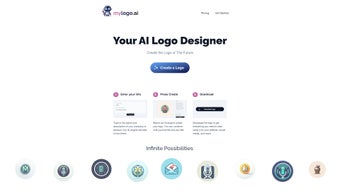

Download MyLogo – AI‑Powered Logo Design Tool, Free, Secure & Fast
Overview
MyLogo is a next‑generation, AI‑driven logo creation platform that removes the guesswork from brand identity design. By simply entering your company name, industry sector, and a brief tagline or style description, the intelligent engine instantly generates a curated collection of unique logo concepts. Each concept arrives as a high‑resolution raster PNG and a fully editable SVG vector file, guaranteeing flawless scalability from business cards to billboard‑size signage.
MyLogo follows a “try for free” model, allowing entrepreneurs, freelancers, and small teams to explore unlimited design prompts before committing to a paid plan. This approach dramatically lowers the entry barrier for quality branding, especially for startups with tight budgets. All generated logos come with a royalty‑free commercial license, meaning you can embed the mark in any marketing material, product packaging, or digital asset without worrying about future licensing fees.
Although the core of MyLogo is automated, it still provides essential customization tools such as a one‑click color palette generator, a library of over 500 fonts, and flexible layout controls, giving you enough creative freedom to fine‑tune a brand‑ready visual. The interface is fully browser‑based, responsive, and optimized for speed, allowing you to design from a Windows PC, a macOS laptop, an Android tablet, or an iOS phone. In short, MyLogo delivers a professional‑grade logo quickly, affordably, and securely, making it an ideal solution for anyone who needs a polished brand identity without the traditional time‑consuming design process.
Key Features & How to Get Started
- AI‑driven design engine that generates dozens of logo concepts in under a minute.
- Instant high‑resolution PNG export and scalable SVG vector files.
- Royalty‑free commercial licensing for all generated logos.
- Text‑to‑image prompts that let you describe style, color, mood, and industry.
- Unlimited free‑trial designs before any subscription is required.
- One‑click color palette generator aligned with your brand personality.
- Typography library with over 500 font families and advanced kerning controls.
- Responsive web app compatible with Windows, macOS, Linux, Android, iOS, and any modern browser.
- Secure cloud storage with SSL/TLS and AES‑256 encryption for all assets.
- Flexible subscription plans, easy cancellation, and no hidden fees.
Getting started with MyLogo is deliberately straightforward, ensuring that even users with zero design experience can create a professional logo in minutes. First, navigate to MyLogo.com and click the “Try for Free” button. You’ll be prompted to create an account using your email address or a social login (Google or Apple).
After confirming your email, the dashboard welcomes you with a clean, intuitive layout that guides you step‑by‑step. Enter your business name, a concise tagline, select your industry from a dropdown menu, and add a few style keywords such as “minimalist”, “vibrant”, or “retro”. Press “Generate Logos” and let the AI engine work its magic—most users see a set of 10‑15 high‑quality thumbnails within 10‑15 seconds.
From there, you can bookmark up to three concepts for deeper customization. The built‑in editor allows real‑time adjustments: drag a color swatch to instantly change the palette, swap fonts from the extensive library, or reposition elements using the alignment guides. A live preview shows how the logo will appear on a website header, business card, and social media avatar, helping you visualize the final impact.
When you’re satisfied, click “Download” and choose PNG for web‑ready assets or SVG for print‑ready, fully editable files. All files are stored securely in your personal cloud workspace, enabling you to return later for revisions or to share a live link with teammates for collaborative feedback. If you decide to upgrade, simply visit the “Pricing” tab, select a plan, and complete payment via Stripe or PayPal.
The subscription can be cancelled at any time from the “Account Settings” page, ensuring complete control over your budgeting.
Compatibility, System Requirements, Pros & Cons
MyLogo is a cloud‑native solution that runs in any modern web browser, making it compatible with a wide range of operating systems and devices. Officially supported platforms include:
- Windows 10/11 – Chrome, Edge, Firefox
- macOS Monterey and later – Safari, Chrome, Firefox
- Linux distributions – Chromium‑based browsers
- Android 9.0+ – Chrome, Firefox
- iOS 13+ – Safari, Chrome
The application only requires a stable internet connection (minimum 3 Mbps) and at least 2 GB of RAM. Because the heavy AI processing occurs on MyLogo’s servers, local CPU/GPU resources are barely taxed, allowing even older laptops or tablets to run the interface smoothly. For the best experience we recommend the latest version of Chrome or Safari, as they provide optimal WebGL performance and faster rendering of vector previews. Users on slower connections may notice a brief loading delay when generating high‑resolution previews, but the final SVG files download instantly once the server finishes processing. Additionally, MyLogo supports Progressive Web App (PWA) installation, enabling you to add a shortcut to your desktop or mobile home screen for quick access to saved projects—though logo generation still requires an online connection.
Advantages
- Lightning‑fast AI generation delivers multiple concepts in seconds, dramatically cutting design time.
- Unlimited free‑trial design attempts lower the barrier for small businesses and startups.
- High‑resolution PNG and fully editable SVG exports meet any print or digital need.
- Royalty‑free licensing eliminates future legal concerns and hidden costs.
- Browser‑based operation means no installation, works on all major OSes, and updates automatically.
- Secure cloud storage protects branding assets with industry‑standard encryption.
- Flexible subscription model with easy cancellation and transparent pricing.
Drawbacks
- Limited manual control compared with full‑featured desktop suites like Adobe Illustrator.
- Creative output heavily depends on the specificity of input prompts; vague descriptions can yield generic results.
- Advanced branding assets (e.g., complete brand guidelines) are reserved for higher‑tier plans.
- Internet dependency—offline work is not possible, which may be a concern for users with unreliable connectivity.
- Niche industries with highly specialized visual languages may find the AI’s style library less tailored.
Frequently Asked Questions
Can I use the logos created with MyLogo for commercial purposes?
Yes. Every logo generated through MyLogo is delivered with a royalty‑free commercial license, allowing you to use it on websites, merchandise, advertising, and any other business material without additional fees.
Do I need any design experience to create a logo?
No. MyLogo’s AI engine handles the heavy lifting. By providing simple text prompts—company name, industry, and style keywords—you can obtain professional‑grade concepts without prior design knowledge.
What file formats are available for download?
You can download logos as high‑resolution PNG for web use and as scalable SVG for print, signage, or further editing in vector‑based software.
Is there a limit to how many logos I can generate during the free trial?
The free tier offers unlimited logo generation, allowing you to experiment with as many concepts as you like before deciding on a paid plan.
How secure is my data on MyLogo’s cloud storage?
MyLogo employs SSL/TLS encryption for data in transit and AES‑256 encryption for files at rest. Your projects are stored on reputable cloud servers that undergo regular security audits.
Can I collaborate with team members during the design process?
Yes. MyLogo includes a “Collaborate” feature that generates a shareable link. Team members can view, comment, and suggest changes directly on the live design draft, streamlining feedback loops.
Conclusion & Call to Action
MyLogo delivers a compelling blend of speed, affordability, and professional quality that makes it an excellent choice for startups, freelancers, and small businesses seeking a polished visual identity without the overhead of traditional design agencies. While power users may miss the deep pixel‑level control of desktop suites, the AI‑driven workflow eliminates costly contracts and lengthy revision cycles, allowing you to launch a brand‑ready logo in under ten minutes. With royalty‑free licensing, high‑resolution exports, secure cloud storage, and true cross‑platform accessibility, MyLogo stands out as a reliable, future‑proof solution for modern branding needs. Ready to give your business a memorable face? Click here to start your free trial and generate a professional logo in minutes—no credit card required.



.png)



